TAPAK

SecretLeak attribution for government agencies

A secret document leaked. TAPAK knows whose copy it was.

Every recipient gets a copy that looks like everyone else’s but carries an invisible fingerprint of its own. When that copy turns up as a photo, a screenshot or a forwarded PDF, TAPAK names the recipient and says how likely it is that the accusation is wrong.

  • Runs on the internal network, no cloud services
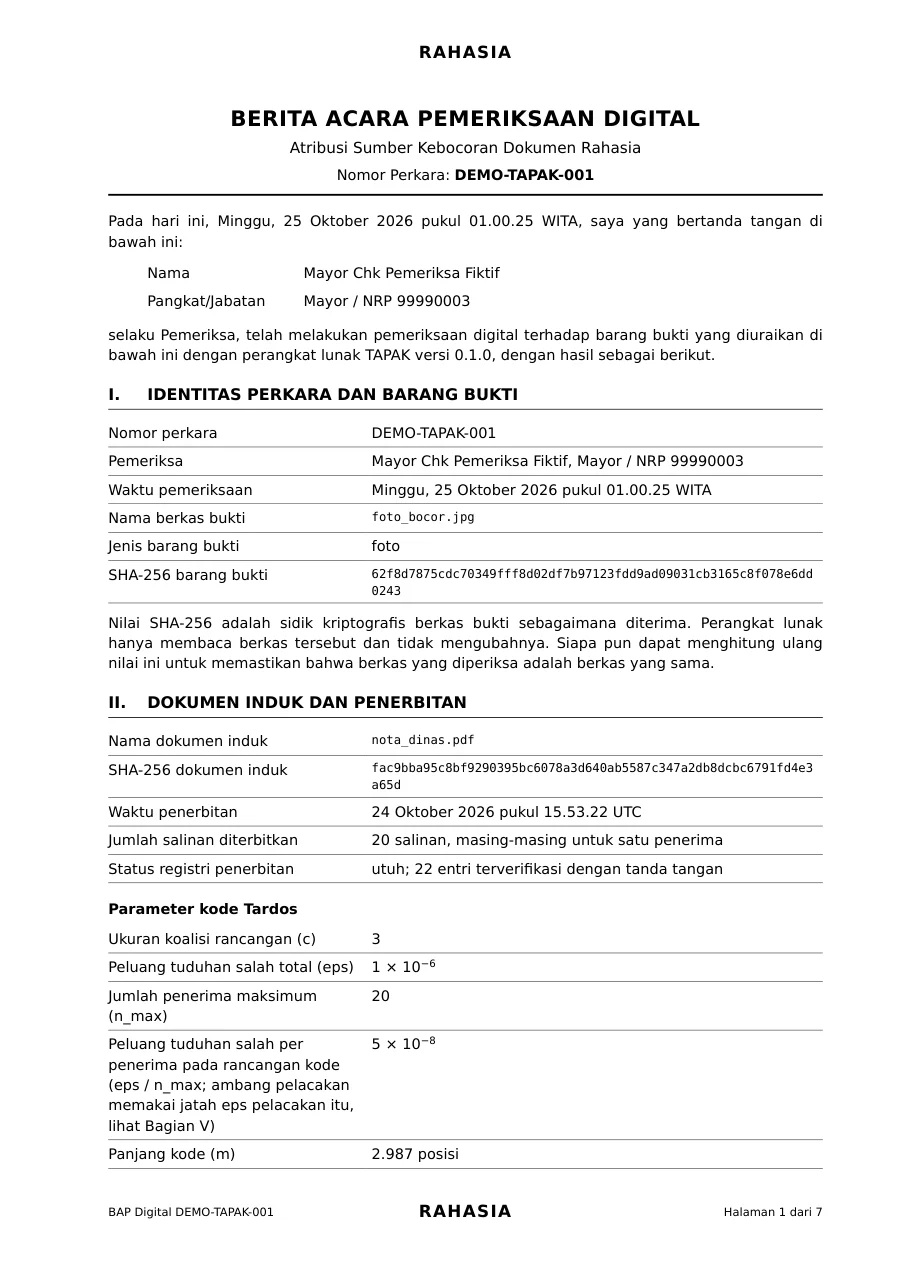
  • The result comes out as a forensic report PDF

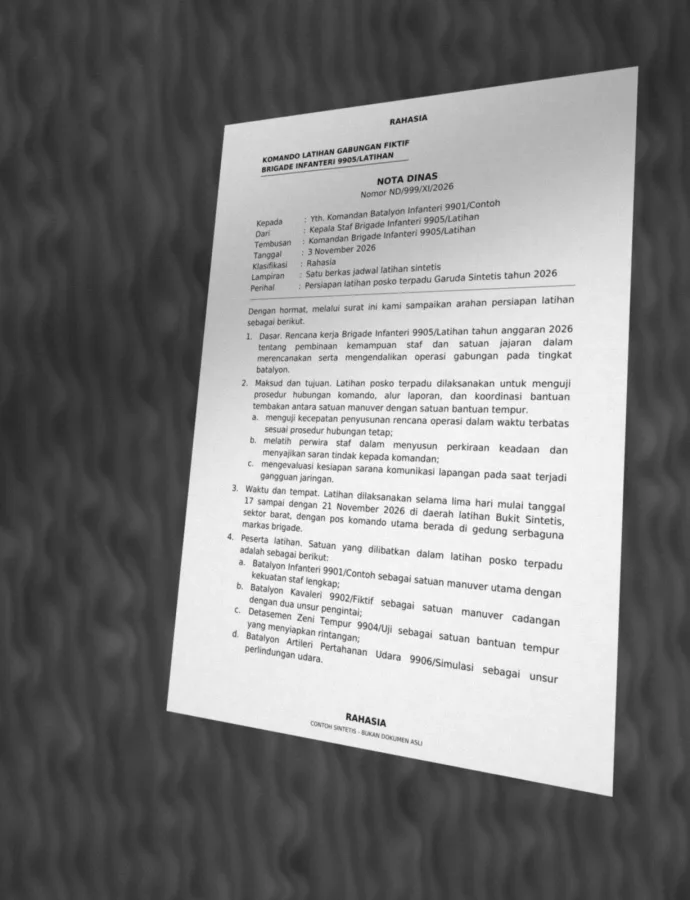
A real run: a synthetic photo of copy #13 traced by TAPAK. All documents and names are fictional.

0 false accusations in 6,148 held-out test traces
1 in a million cap on the chance of a false accusation, fixed before the evidence is scored
3 of 3 colluders named in every simulation where three recipients merged their copies (8,000 simulations)
24 dpi a full-page screenshot this blurry is still traced

01The problem

Leaks today don’t go through a server. They go through a phone camera.

Someone photographs a page on their desk and sends it to one group chat. An hour later the photo is everywhere, and anyone who received the document could be the source.

  • Logs and network security never see it. A photo of a screen or of paper never passes the agency’s servers, email or DLP system.
  • A name watermark is easy to remove. The recipient’s name in the corner is cropped out or covered with a finger before the photo. After that every copy looks the same again.
  • Guessing damages the unit. A manual investigation takes weeks, and one wrong accusation can end an innocent person’s career.

Compared with the usual methods

Ways to trace a leak and what each can do
Question Visible name watermarkMetadata and access logsNetwork security (DLP)TAPAK
Still works when the document is photographed? yesnonoyes
Still works when the name is cropped or covered? nononoyes
Names a recipient, not just a device or an account? yespartlypartlyyes
Holds up when several recipients merge their copies? nononoyes
States its chance of a false accusation? nononoyes
Runs without cloud services? yespartlypartlyyes

02How it works

Three steps. Nothing changes for the recipients.

  1. 1

    Issue

    Upload the PDF and the recipient list. TAPAK makes one copy per person, each with its own fingerprint. To the eye they are all identical.

    20 copies in a few seconds

  2. 2

    Leak

    A copy is photographed, screenshotted, printed or forwarded. The fingerprint goes with it, even in a crop of part of a page.

    Photos, screenshots, prints, PDFs, text

  3. 3

    Trace

    Upload the evidence that is going around. TAPAK reads what is left of the fingerprint and names the recipient, or answers not enough evidence when there is too little to go on.

    The result becomes a forensic report PDF

03Invisible fingerprints

Five layers of fingerprint. Lose one, the rest still talk.

Words moved by 0.025 millimetres, a faint dot pattern in the background, invisible characters, reworded sentences and a canary address. Each layer survives a different kind of leak, and the decoder combines whatever is left.

Fingerprint layers and the leaks each one survives
Layer Forwarded PDFScreenshotPhotoPrintCopied textRetyped
Word and line shifts0.025 mm per word survivessurvivessurvivespartlynono
Background dot patternfaint dots the eye does not read survivessurvivessurvivespartlynono
Invisible characterscopied along with the text survivesnononosurvivesno
Sentence variantsrewordings a person approved survivessurvivessurvivessurvivessurvivespartly
DNS canarygoes off when opened outside the network partlynonononono
Three fingerprint layers on a real copy, magnified: letters shifted by 0.025 mm, the background dot pattern amplified 40 times, and zero-width symbols between words
Three layers on a real copy, magnified. Without magnification the copy looks exactly like its master.

04Evidence

Tested thousands of times. Zero innocent people accused.

Every number below comes from a result file in the repository: fictional documents, synthetic evidence plus phone photos of real prints, and test sets run once after the rules were locked.

How often TAPAK names the right recipient

Evidence that falls short gets not enough evidence. Not one result named someone else.

Real prints: three copies, one printer, photographed with a phone

  • Phone photos of real prints 18 of 18 (100%)
  • The same photos after a messaging app 18 of 18 (100%)

Benchmark: synthetic photos and prints

  • Photos of a screen and screenshots 40 of 40 (100%)
  • Photos with phone camera processing 32 of 32 (100%)
  • Photos of a monitor 32 of 32 (100%)
  • Printed and photographed, two pages 8 of 8 (100%)
  • Printed and photographed, one page 10 of 16 (62%)

Registration study: partial and blurry evidence, held-out set

  • Whole pages at 24 to 48 dpi 440 of 440 (100%)
  • Cropped screenshots 1,191 of 1,280 (93%)
  • Phone photos of part of a page 171 of 208 (82%)
  • A single paragraph 161 of 240 (67%)

Study of photos cropped by the leaker, held-out set

  • Phone photos cropped and then shrunk 561 of 800 (70%)

A clear accusation line

8,000 simulations of three people colluding, with eight strategies for merging their copies. No innocent score came near the line, and no colluder got away.

Accusation score divided by the threshold: innocent recipients and colluders The scores of 776,000 innocent recipients reach at most 72 percent of the threshold. The scores of 24,000 colluders are at least 136 percent of the threshold. No score falls between the two. empty gap 0× 1× 2× 3× accusation threshold innocent colluders
776,000 innocent recipients’ scores, highest 72% of the threshold 24,000 colluders’ scores, lowest 136% of the threshold

How small the chance of a false accusation is

A name is given only when that chance is below one in a million. On the test photos it is usually far smaller.

Bound on the chance of a false accusation per kind of evidence, log scale A name is given only when the bound is below 10 to the power of minus 6. Screen photo: median 10 to the power of -89, worst 10 to the power of -7. Phone ISP photo: median 10 to the power of -82, worst 10 to the power of -58. Monitor photo: median 10 to the power of -81, worst 10 to the power of -6. Print, 2 pages: median 10 to the power of -14, worst 10 to the power of -11. Print, 1 page: median 10 to the power of -9, worst 10 to the power of -6. 1 10−20 10−40 10−60 10−80 10−100 needed to give a name Screen photo Phone ISP photo Monitor photo Print, 2 pages Print, 1 page further right is smaller →
median per kind of evidence weakest evidence that was still named

05For agencies

Built for the way government agencies work

Ministries and agencies, the armed forces and the police, regional governments, strategic state enterprises: anywhere classified documents go out to many people.

The data never leaves the agency

Issuing, tracing and the registry run on an internal computer or server. No cloud services and no telemetry. The only traffic from outside is the DNS queries the canary listener receives, and canaries are optional.

The registry stores hashes and codes only, never document text or evidence images.

Evidence that stands up
Every verdict carries its score, threshold and false-accusation bound, written up as a forensic report PDF ready for the examiner’s signature.
A registry that cannot be changed quietly
The issuance record is append-only, SHA-256 chained and Ed25519 signed. A third party can check it with the public key alone.
Fair from the start
The accusation threshold is fixed and recorded before the evidence is scored. When the evidence falls short, the answer is not enough evidence.
Light to deploy
One ordinary laptop or server, no GPU, available as a Docker container. The interface is in Indonesian and English.

Good for

  • Telegrams
  • Official memos
  • Operation plans
  • Procurement documents
  • Closed-meeting briefs
  • Selection exam papers
  • Intelligence reports
  • Draft regulations

06Rollout

Start with one unit

  1. 1

    Pilot

    Install TAPAK on one internal server. Issue real documents to real recipient lists, and practise tracing with test evidence.

  2. 2

    Operator training

    Operators learn to issue, trace, read results and verify the registry. The guided demo in the app is the training material.

  3. 3

    Step-by-step expansion

    Connect it to the official correspondence workflow, add units, keep the registry anchor log somewhere separate, and run the canary listener on an outside network.

See it for yourself in three minutes.

The guided demo uses a fictional document: issue 20 copies, leak one as a phone photo, then trace the leaker.